



When I need to arrange an intercity bus trip without turning the planning into a long research session, Greyhound: Buy Bus Tickets is the app I would open first. It is a free travel and local app from Greyhound Lines Inc, built around the practical job of finding and booking a Greyhound journey from a phone. I found the experience most useful when I already knew roughly where I wanted to go and needed to turn that idea into a ticket quickly.
The app has a focused purpose rather than trying to become a complete travel planner. That focus is its main advantage. You are not browsing a huge mix of airlines, hotels, rental cars, and unrelated travel services. You are working with Greyhound’s own bus-booking experience, which makes the route search feel more direct when Greyhound is the operator you intend to use.
It is also a mature product. The app was released on October 27, 2014, and the current version is 9.84.0. On the store, it carries a 4.7 average from around 121 thousand ratings, with more than a million installs. Those figures suggest that it has become a familiar tool for many passengers, although popularity should not replace checking whether the available route and schedule fit your particular trip.
From an uncertain trip idea to a booked bus journey
Starting with the actual travel problem
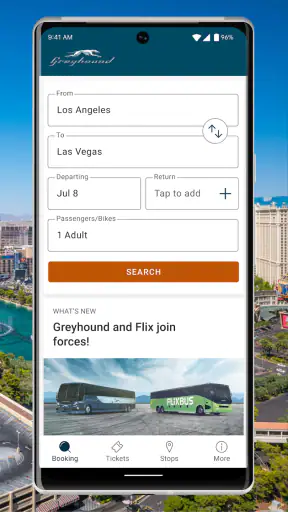
A realistic use case is a weekend visit where driving is inconvenient, flying feels excessive, and I want to compare bus departures without sitting at a desktop computer. I start with the basic facts: origin, destination, travel date, and whether I need a return journey. That sounds obvious, but it is worth deciding these details before opening the search screen because a vague plan often creates unnecessary back-and-forth.
The app works best when the trip is primarily a Greyhound trip. If I am looking for every possible bus company, the app is not the same kind of tool as a broad comparison service. Its strength is handling the Greyhound side of the decision, not giving me a complete view of every carrier that might serve the road.
That distinction matters for price and convenience. A Greyhound departure may be the right answer because of its timing or route, but another operator could be preferable for a different departure, a different station, or a simpler connection. I would use this app to investigate and book Greyhound travel, then use another source only when I specifically need a wider market comparison.
Entering a route without rushing the details
The first practical step is entering the departure and arrival locations. I take a moment to check the selected places carefully rather than relying on the first suggestion that appears. Bus travel can involve terminals that are not as interchangeable as airport names, and a small location mistake can affect the whole plan. This is one of the most important habits when using a mobile booking app: confirm the place, date, and direction before moving on.
After choosing the travel date and trip type, I review the available results as a schedule rather than treating the first option as automatically best. A departure that looks convenient on paper may create a difficult arrival time, a long wait before the next part of my journey, or an awkward handoff to local transport. The app makes the search part straightforward, but the judgment still belongs to me.
I also prefer to search with enough time to think. Booking while standing outside a station or trying to catch a bus can make it too easy to overlook a connection detail. The app is designed for convenience, but convenience is not the same as a substitute for reading the itinerary carefully.
Reading the result as a complete itinerary
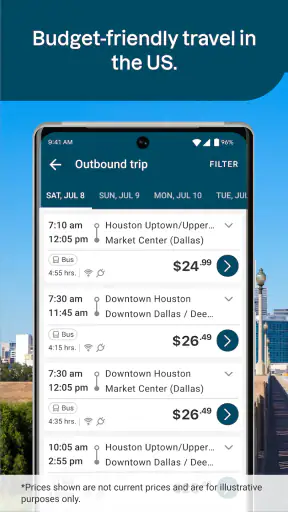
Once the route results appear, I compare departure and arrival times, the number of steps in the journey, and the overall shape of the trip. A direct-looking option is usually easier for a first-time passenger, while a cheaper or better-timed choice may involve a handoff. The important question is not simply “Which bus leaves earliest?” but “Which itinerary can I realistically manage from my front door to my final stop?”
This is where the app becomes more useful than a simple timetable. It puts the available Greyhound journey into a booking flow, allowing me to move from searching to selecting without switching immediately to a browser. Still, I would not assume that an itinerary is comfortable just because it is available. A late arrival can be a poor choice if local buses have stopped running, and a tight transfer can be stressful if the first leg is delayed.
A useful personal workflow is to take a screenshot or note the selected departure details before paying, especially when I am coordinating with someone else. That gives me a quick reference while arranging a ride to the station or explaining the plan to a friend. It also reduces the chance of confusing the outbound and return portions of a round trip.
Moving from selection to purchase
After choosing a journey, the app leads into the booking stage. This is the point where I slow down again. I check the passenger information, the travel direction, and the final purchase details before confirming. A fast interface is helpful, but travel bookings are consequential: correcting an accidental date or destination choice can be much more troublesome than catching the mistake before payment.
The fact that the app is free to install is useful for occasional travelers and people who do not want another paid planning tool. Free access does not mean the journey itself is free, of course, so I treat the app as a booking channel rather than as a source of complimentary travel. The value is in reducing the work involved in arranging the ticket.
For a first booking, I recommend using a stable connection and keeping the phone available until the transaction is complete. If the process is interrupted, I would avoid immediately attempting a second purchase without checking whether the first attempt went through. Duplicate bookings are an avoidable risk whenever a payment screen or confirmation step is interrupted.
The handoff from phone to passenger
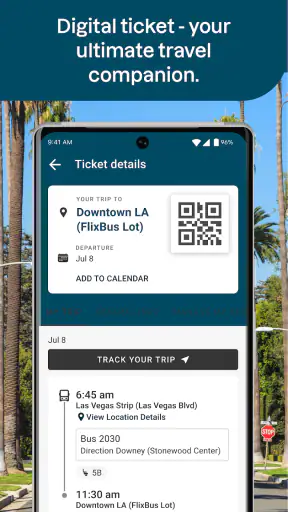
Booking is only one handoff. The app transfers the plan from a physical bus station or a website into a phone, and then the passenger has to carry that information into the real journey. I keep the booking confirmation accessible and make sure my phone has enough battery for the trip. The app can simplify the purchase, but it cannot remove the need to arrive prepared.
This is especially important when the passenger is not the person who made the booking. If I buy a ticket for a relative, I would send that person the relevant travel details in a clear message rather than assuming they will know how to find everything inside my account or on my device. A booking app is convenient for the organizer, but the traveler still needs practical access to the itinerary.
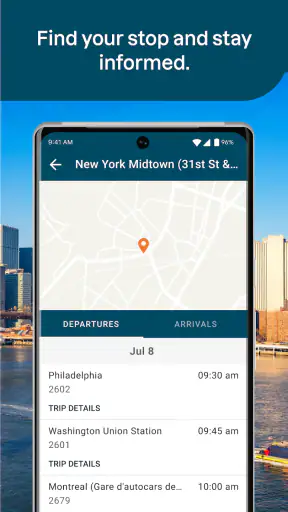
Another handoff occurs between Greyhound and local transportation. The app helps with the Greyhound portion, while I still need to plan how to reach the departure point and how to continue after arrival. I would check local transit, walking distance, or pickup arrangements separately. This is a non-obvious limitation of a focused carrier app: it can make the central booking easy while leaving the first and last parts of the journey to me.
What the outcome feels like
When everything lines up, the result is pleasantly simple. I can move from a route idea to a Greyhound booking without building the trip through several unrelated screens or services. For a familiar route, that directness is more valuable than a crowded collection of extra travel tools. I know what the app is for, and it generally stays on that job.
The experience is particularly appealing for passengers who already prefer bus travel and want a convenient mobile way to arrange it. It can also suit someone booking for a family member, provided the organizer carefully passes along the final itinerary. Because the content rating is Everyone, the app is positioned for general use rather than a narrow adult audience.
I would recommend it to students, occasional visitors, and travelers who want to check Greyhound options while away from a computer. I would also consider it useful for last-minute planning when the route is familiar and the passenger has enough time to review the result. The strongest benefit is not a long list of features; it is the reduction of friction between deciding to travel and having a Greyhound ticket arranged.
Where the flow breaks down
The main weakness is the same focus that makes the app convenient. If my priority is comparing Greyhound with every other bus operator, I need another tool. The app is not a neutral marketplace in which all carriers appear side by side. That can make it less suitable for budget-focused travelers who want the broadest possible set of alternatives before committing.
It can also be a poor fit when the trip has complicated connections outside the Greyhound portion. Someone planning a multi-city journey with rail, local transit, and several carriers may prefer a general travel planner that presents the whole route in one place. Greyhound’s app can handle its own booking task, but I would not expect it to replace every other planning step.
Another point of friction is the responsibility placed on the traveler to interpret the itinerary. A listed departure is not automatically a good departure. I still need to consider terminal access, transfer time, arrival conditions, and what happens if the plan runs late. This is not a defect unique to the interface, but it is easy to forget when a polished booking flow makes the trip feel more settled than it really is.
I would also skip relying on it as my only travel reference if my phone access is uncertain. A charged device and a practical backup of the booking details are sensible preparation. The app makes the ticket easier to arrange, but the passenger should not treat the phone as the only part of the travel plan.
Small habits that make the app more useful
My first tip is to search the outbound and return portions with equal care. A round trip can look efficient because the departure is convenient, while the return leaves at a difficult hour. Reviewing each direction as its own real-world problem helps avoid choosing a return simply because it is bundled into the same search.
My second tip is to judge a connection by the handoff, not just by the timetable. If I have luggage, limited mobility, a child with me, or an unfamiliar terminal, I want more breathing room than I might accept on a simple solo trip. A slightly less convenient departure can be the better choice when it reduces the chance of missing the next leg.
My third tip is to separate booking confirmation from travel preparation. After purchasing, I make a short checklist for the station, the route to the terminal, the arrival plan, and the phone battery. This turns the app’s successful outcome into an actually usable journey. Many travel problems happen after booking, not during it.
My fourth tip is to use the app as a carrier-specific starting point when friends ask me to find a bus. I first establish whether Greyhound serves the route in a workable way, then compare broader alternatives only if the time, price, or transfer pattern is not suitable. That prevents wasting time comparing everything before checking the operator I already expect to use.
How it compares with familiar alternatives
Compared with booking through a desktop browser, the mobile app feels better suited to people who plan while moving around. I can begin with a phone rather than waiting to reach a computer, and the focused design keeps the task centered on Greyhound. A browser may still be preferable for someone who wants to inspect several travel sites in separate tabs or work with a larger screen.
Compared with broad travel-search apps, this option is narrower but more direct for Greyhound passengers. A comparison service is better when the deciding factor is the entire market. The Greyhound app is better when the carrier is already part of the decision and I want a straightforward route-to-ticket path.
Compared with buying at a station, mobile booking can save a separate visit and lets me organize the trip before leaving home. The trade-off is that I must enter the information correctly and keep track of the digital booking myself. In-person help may feel more reassuring for a passenger who has unusual needs or is uncomfortable handling travel details on a phone.
Who should use it and who should look elsewhere
I think this app is a good match for anyone who regularly considers Greyhound, wants a free booking tool, and is comfortable checking schedules independently. Its strong rating and broad install base make it feel established, while the long history of the app suggests that it is not a brand-new experiment. The current version also indicates that Greyhound continues to maintain the mobile experience.
I would point a friend toward it when the destination is served by Greyhound, the trip is reasonably simple, and the friend wants to complete the booking without unnecessary detours. It is also practical for arranging a journey from a phone when the traveler already understands the station and local transport situation.
I would steer someone elsewhere when they need a full comparison across carriers, a complex door-to-door itinerary, or extensive assistance evaluating unfamiliar connections. In those cases, a general travel service or direct human support may be a better first step. The app is most convincing when its limits are accepted: it is a focused Greyhound booking tool, not an all-purpose travel concierge.
My final view after following the whole journey
From entering a route to handing the resulting plan over to the passenger, Greyhound: Buy Bus Tickets succeeds because it keeps the central task understandable. I like that it does not require me to treat bus booking as a major project. The route search, selection, and purchase stages form a sensible workflow for ordinary Greyhound travel.
Its limitations are practical rather than surprising. I still need to compare other operators when value or timing matters, inspect connections with care, and plan the parts of the journey that happen before departure and after arrival. Those responsibilities mean the app cannot make every bus trip effortless.
Even so, I would recommend installing it if Greyhound is a realistic option for your next trip. It is free, rated for Everyone, and maintained by Greyhound Lines Inc. For a straightforward carrier-specific booking, it gives me the outcome I want: a clearer path from “I need to get there” to a Greyhound journey I can actually prepare for.


